Selected work

Offline-first social tasks

Nudge

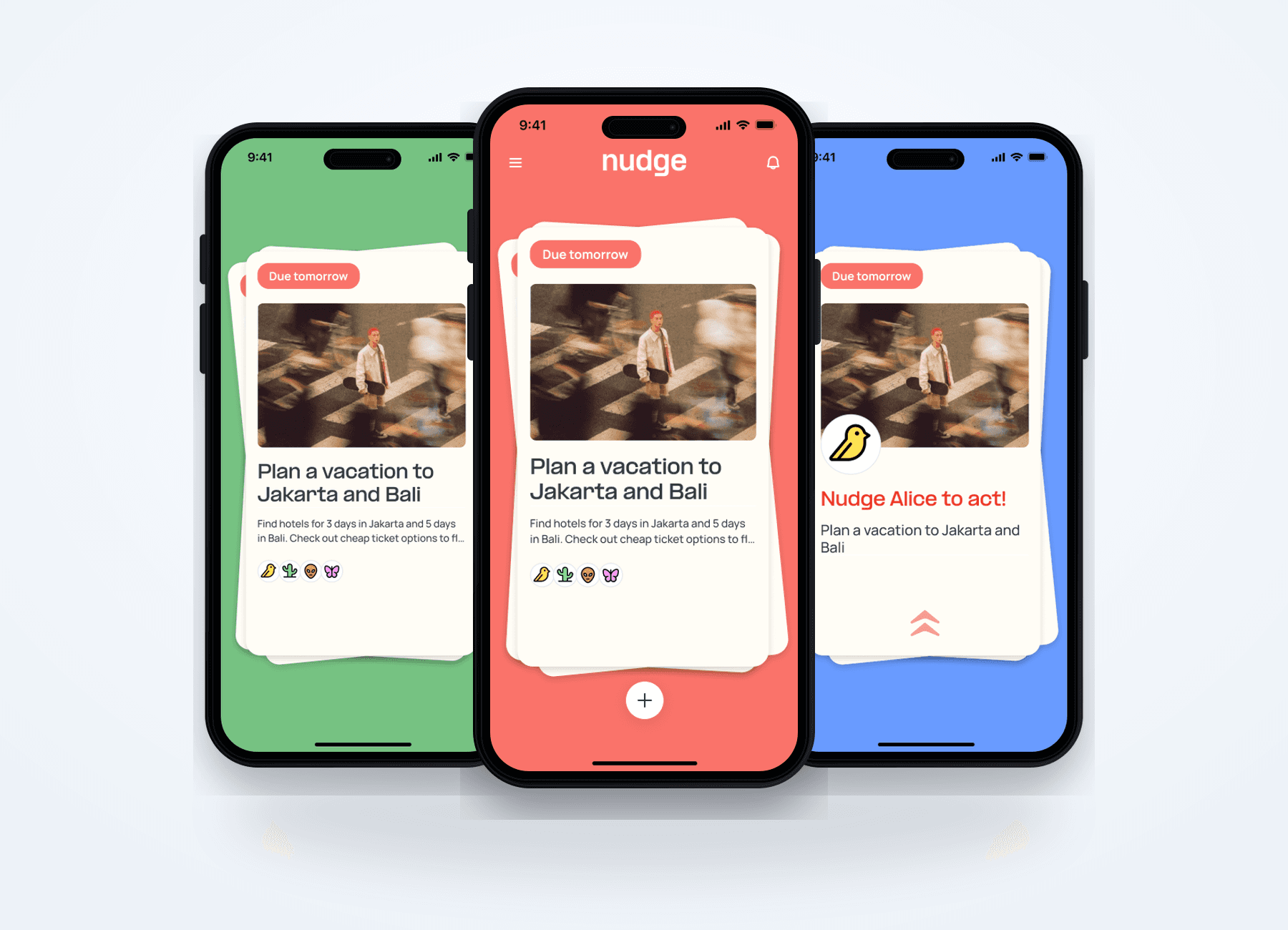
Nudge was built as a simple social task app on the surface, powered by an offline-first collaborative architecture underneath.

Nudge is a lightweight social task experience for repeated group planning, built with a simple gesture surface and a local-first sync architecture underneath.

React NativePowerSyncSupabasePostgreSQLSupabase AuthRLS
Role
Full Stack Developer
Experience context
Ownpath · Nov 2025–Present
Client / company
Vendaka Pvt. Ltd.
Article length
14 sections
A Nudge mobile task deck connected to offline sync and collaborator architecture nodes
Offline-first task UI, sync flow, and collaborator model
Local-firsttask creation before network confirmation
2 rolesowner and nudger collaboration model
4 gesturescomplete, postpone, nudge, archive
01

Overview

Nudge is a lightweight social task experience for people who plan things together repeatedly: friend groups organizing trips, shared routines, small events, and everyday responsibilities.

The product idea was intentionally simple:

  • Create a task.
  • Add the people involved.
  • Let the group keep each other accountable.
  • Complete, postpone, nudge, or archive tasks through a small set of gestures.
02

Context

In many friend groups, planning is shared in theory but managed by one person in practice. One person creates the plan, follows up, reminds everyone, and keeps track of what is unfinished.

Nudge was designed to distribute that responsibility across the group.

The task owner could create and complete a task. Contributors could participate and nudge the task when it needed attention. The same flow also worked for personal task management, where the value came from making progress feel immediate and visible.

As the full-stack developer on the project, the goal was to make the interaction feel fast and natural while building the data and sync behavior underneath it.

03

The challenge

The product needed to satisfy several expectations at once:

  • A user should be able to start creating a task without a reliable connection.
  • A task should support an owner and multiple contributors.
  • Different people should have different roles within the same task.
  • Changes made by one person should reach the rest of the group.
  • Completed, postponed, and archived tasks should stay in the right place.

The challenge was not creating a card or adding a swipe animation. It was making those small interactions trustworthy when the device, network, user role, and task state could all affect what happened next.

04

Product surface

The main task experience was built around a compact gesture language:

  • Swipe right to complete a task.
  • Swipe left to postpone it.
  • Swipe up to nudge collaborators.
  • Swipe down to archive it.

That gave Nudge a clear product personality. It also meant every gesture had to connect to a real rule.

For example, an owner could complete or archive a task, while a contributor with the nudger role could send a nudge. The interface had to feel immediate, but it could not let every user perform every action.

The visual simplicity was therefore both a product decision and an engineering constraint.

05

Technical approach

The approach

Local first, then sync

Offline support was part of the product promise from the beginning.

PowerSync gave the app a local data layer that could respond immediately and synchronize with Supabase when a connection was available.

The key decision was to create a task locally first.

When a user saved a task, Nudge generated its ID and wrote the task into the local store. The task appeared in the app without waiting for a successful network request. The sync layer then uploaded the change to Supabase when the app was online.

Sync rules versus relationships

PowerSync was the right choice for local-first behavior, but it introduced a sync-model limitation.

Nudge was relationship-heavy. A task was connected to:

  • Its creator.
  • Its participants.
  • Participant roles.
  • People who should receive activity and notifications.

Some features naturally depended on join-style queries: find the tasks connected to a user through the participant table, then bring related task and user data into the local experience.

The legacy PowerSync Sync Rules setup did not support JOINs, including outer-join patterns some features needed.

This created a split:

  • Supabase could represent and query the relationships correctly.
  • The sync configuration could not express the same logic directly.

As a result, data could exist correctly in Supabase while the local data was incomplete or did not arrive in the expected bucket.

06

Architectural adaptation

The architecture was adapted around the limitation:

  • Sync task, participant, and user records as separate pieces of data.
  • Resolve relationship access through explicit IDs instead of depending on joined sync results.
  • Keep role checks and participant reads in the task service, where relationship logic could be controlled.
  • Keep the local PowerSync schema, Supabase tables, and sync configuration aligned as separate things to verify.
  • Add schema inspection, clean-start, and sync-test tooling so missing relationships could be traced instead of guessed at.

This added work under the surface, but it created a more predictable boundary.

07

RLS, participants, and attachments

Access control

Sync was not the only boundary between Supabase and the local experience.

Row Level Security protected the data, but it also meant that a correct query was not enough. The user had to be authenticated, the task relationship had to be visible, and task attachments had to be readable through the right Storage access path.

This became visible in two places:

  • Participant reads could return incomplete data when the current user's relationship to the task was not visible under the participants policy.
  • Owner-uploaded task images introduced a second permission boundary.

Uploading the file and reading it back were separate access problems.

A feature could look correct in the database and still appear empty in the app because RLS or Storage visibility filtered the response.

The solution was not to bypass RLS. The app aligned its ownership model with Supabase Auth, made participant access policy-aware, tested authenticated reads and writes, and treated image upload/readback as a separate recoverable flow.

08

Collaboration model

A task is also a relationship

Adding contributors changed the shape of the product.

A task was no longer just a title and a status. It also needed to know:

  • Who created it.
  • Who could act on it.
  • Who should receive a nudge.

The participant model used two roles:

  • Owner
  • Nudger

That model made collaboration possible, but it revealed a timing problem.

A locally created task could be visible on the device before its remote record existed. Participant records depended on that remote task record, so adding them too early could fail at the database relationship level.

The solution was to separate the visible product flow from the underlying write order:

  1. The task was created locally and shown immediately.
  2. The app waited until the task could be found in Supabase.
  3. The owner and contributor relationships were then created.
  4. The local task view was refreshed in the background.

The group still experienced one task-creation flow. The architecture handled the dependency in stages.

09

Data model

The collaboration model stayed deliberately small:

  • A user represented a person in the circle.
  • A task represented the work, its owner, and its lifecycle.
  • A participant connected a user to a task with a role.

The participant model was the important piece. It expressed shared accountability without turning every task into a group chat or giving every collaborator the same permissions.

10

Role-aware gestures

The swipe deck became more than a presentation component. It became the point where interaction, task state, and permissions met.

Before a user acted on a task, the app loaded relevant participant information and resolved the current user's role. It also used the task creator as an immediate owner signal, which helped the top card remain responsive while role data was loading.

The service layer still checked permissions before completing, archiving, or nudging.

This created two layers of protection:

  • The interface guided the user toward valid actions.
  • The data operation rejected actions that did not match the user's role.

Collaboration needed to feel lightweight, but it could not feel ambiguous.

11

Debugging and tooling

The biggest development slowdown came from the number of systems involved in a single task:

  • Mobile interface.
  • Local PowerSync database.
  • Supabase database.
  • Authentication and Row Level Security.
  • Participant relationships.
  • Remote sync rules.
  • Network state.

When something failed, the visible symptom was often far from the root cause.

A task might be missing because:

  • The local schema was stale.
  • The participant table was unavailable.
  • A sync rule was incomplete.
  • A pending operation was being replayed.

The project gained debugging and recovery tooling:

  • Schema comparison tools.
  • Supabase inspection scripts.
  • Clean-start and reset flows.
  • Local insertion tools.
  • Sync simulations.
  • Debug task creation from inside the app.

These tools were not part of the customer-facing experience, but they made the invisible system observable, repeatable, and easier to recover when local and remote states drifted apart.

12

The outcome

What shipped

The project reached test and internal demo builds with stable local-to-Supabase task synchronization.

The implemented system supported:

  • Local-first task creation.
  • Task ownership and contributor roles.
  • Role-aware complete, nudge, postpone, and archive actions.
  • Active, postponed, completed, and archived task views.
  • Participant-aware task visibility.
  • Background refresh and sync recovery behavior.
  • Notifications and task activity.
  • Task images and profile-related flows.

The visible result was a small, approachable task app.

The development result was a system that could keep a collaborative task coherent across local storage, remote data, user roles, and changing network conditions.

13

Development principle

Nudge taught us to work backwards from the feeling the product needed to create.

The feeling was immediacy:

I should be able to capture a task and keep moving.

The feeling was shared responsibility:

This task should belong to the group, not only to the person who remembered it first.

The feeling was clarity:

Every gesture should have a clear meaning and every task should appear in the right place.

Those feelings led to the major technical decisions:

  • Local-first creation for speed and offline support.
  • A participant model for shared accountability.
  • Explicit task states for reliable task movement.
  • Role-aware gestures for clear collaboration.
  • Recovery tooling for dependable development.

The architecture was successful when users did not have to think about it.

14

Why this work matters

Nudge is a useful example of the development work hidden inside a simple mobile product.

The product surface was intentionally small. The engineering system underneath had to coordinate local data, remote sync, relationships, permissions, and state transitions without making the experience feel technical.

We built Nudge as a simple social task app on the surface, powered by an offline-first collaborative architecture underneath.

My contribution

What I owned across this build.

  • Designed the local-first task creation and PowerSync-to-Supabase synchronization flow.
  • Built the owner/nudger participant model that connected gestures to real permissions.
  • Aligned Supabase Auth, RLS, Storage, local schema, and sync rules across task and attachment flows.
  • Created schema inspection, clean-start, reset, local insertion, and sync simulation tooling for debugging.