The context
Mainichi koto began with a study routine that sounded difficult to sustain. While I was learning Japanese, my girlfriend described the traditional method she had used to learn roughly 2,000 kanji: write and recite ten characters a day, then revise them daily. It worked for her, but even describing the routine felt exhausting.
That made me question the unit I was trying to memorize. A kanji does not have one fixed reading in every situation; its reading becomes meaningful inside a word. The insight was not to ignore individual kanji. It was to make the word the center of everyday study, then keep character-level detail available when a learner needs it, especially for exam preparation.
Existing flashcard tools were the closest reference point. Anki is powerful and flexible, but AnkiMobile's price felt high to me as a student, and a general-purpose system still left me assembling the exact Japanese workflow I wanted: my own words, Marathi memory tricks, JLPT groupings, contextual kanji readings, and several kinds of practice.
The challenge
Help learners remember the Japanese words they want to read, while bringing each card back often enough to build durable recall.
Delivering that promise created four connected problems. One word can create several legitimate questions: what the word means, how the complete written form is read, and what reading a specific character takes inside that word.
Practical reading and exam study also need different levels of detail. The whole word supports visual association between characters; per-kanji readings and meanings help a learner inspect the parts. At the same time, editing a source word or changing selected kanji should not reset a mature card to zero.
The final challenge was rhythm. Focused study cannot pause for every database request, so grading had to feel immediate without making persistence unreliable.
The approach
That model let the interface stay approachable while the system handled the differences underneath. A vocabulary entry stores the way I use it: kanji, romaji, English meaning, Marathi tips, and category. Learners can add their own words, search the built-in dictionary, or import an existing list.
Decision 1
Start with words
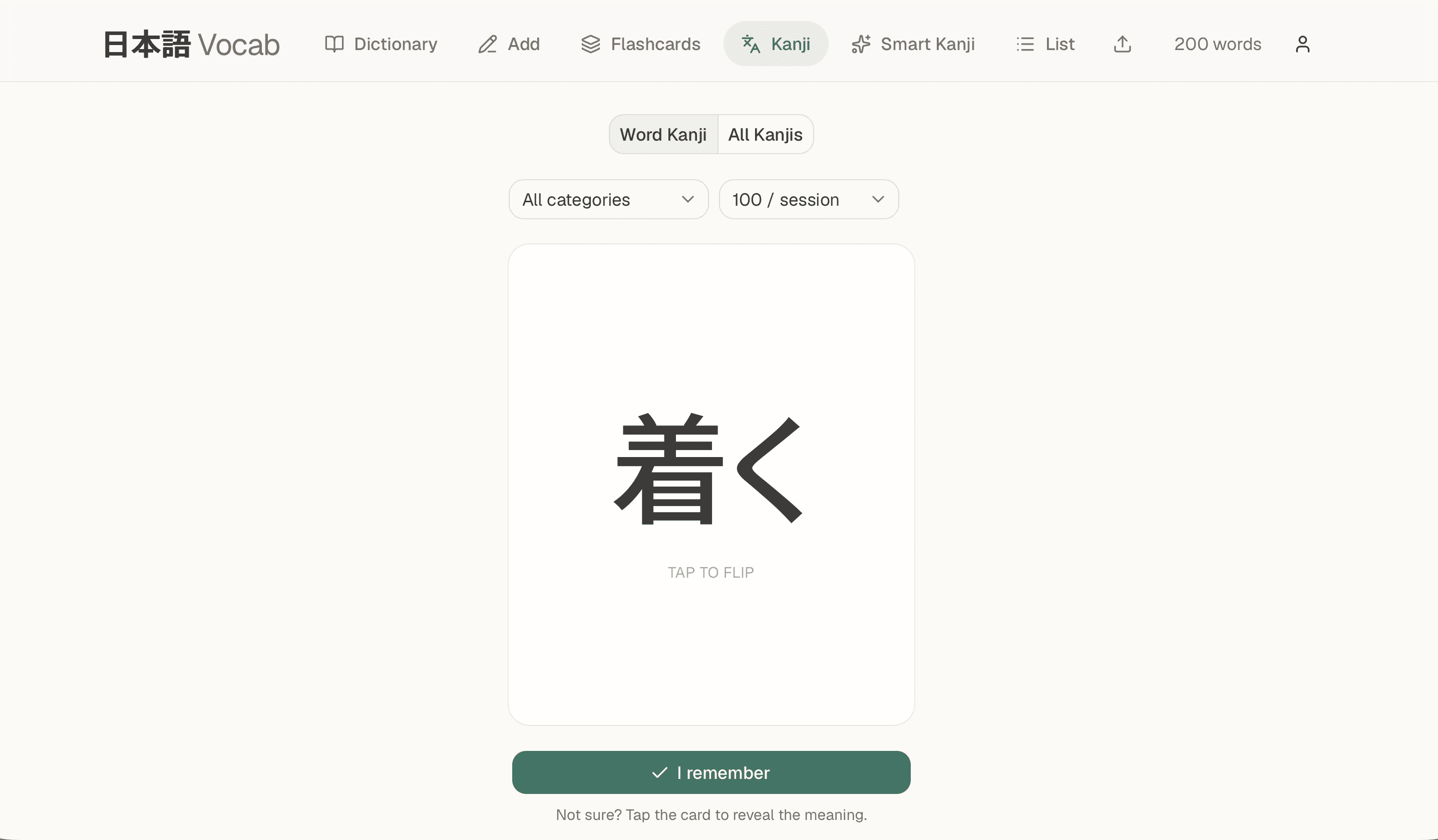
The primary word deck keeps the learning target practical: recognize the word and recall its meaning. A separate Word Kanji deck removes the reading from the front, asking the learner to read the complete written form.
Smart Kanji goes one level deeper. It highlights one character inside a source word and asks what reading that character takes there. That distinction matters because the same kanji can behave differently across words, such as 食 in 食べる and 食 in 食事.
The answer side reconnects the parts: the complete word reading and romaji, the word meaning, and compact readings and meanings for every kanji in the word. The full word creates a visual link between characters, while the per-kanji reference remains useful for focused or exam-oriented revision.
Decision 2
Treat each question as a different memory
The same vocabulary entry powers three study identities. Word asks whether the learner knows what the Japanese word means. Word Kanji asks whether they can read the complete written word from its glyphs. Smart Kanji and All Kanjis ask what reading a character takes in a specific word.
Each identity keeps an independent schedule. Grading a word card never advances the character card, and recognizing one character inside one word does not imply that the learner knows every reading of that character.
Smart Kanji can be filtered cumulatively by JLPT level. All Kanjis removes the level gate and groups examples of the same character together. Learners can also choose exactly which characters in a word should become cards, including ungraded kanji.
Decision 3
Make grading honest
The first grading idea was binary: remembering without flipping was a pass; revealing the answer was a fail. That was too blunt because learners flip for two different reasons. Sometimes they forgot, and sometimes they knew the answer but wanted to confirm it.
Mainichi koto therefore uses three signals. I remember means confident recall without revealing and counts as a strong pass. Got it means the learner recalled, checked the answer, and receives a normal pass. Forgot sends the card back to relearning.
These signals feed a compact SM-2-style spaced-repetition scheduler. Successful reviews lengthen the gap; a lapse brings the card back soon. Inside a session, forgotten cards are reinserted after a short gap. Across days, the server calculates the next due date.
Session rules protect coverage as the vocabulary list grows: overdue reviews are never capped, while new cards enter oldest-first. That fairness rule came from algorithm testing, where a newest-first queue could otherwise keep older cards buried.
Decision 4
Preserve progress and rhythm
The earliest Smart Kanji model treated generated cards too much like disposable projections of word text. When source words or selected characters changed, intervals could be wiped.
The repair was to make a character-in-word card a durable study object. Identity became the learner, source word, and character instead of mutable word text. Deselection made a card inactive instead of deleting it. Reconciliation updated readings and meanings without replacing the schedule. Duplicate legacy cards were merged while preserving the most useful history.
That protected progress, but review speed still mattered. I separated what the learner feels from how the review is committed: the interface advances immediately, then a bounded FIFO queue sends review commands one at a time. The database updates the schedule and history together, rejects stale state, and uses a stable review ID so a lost response can be retried without applying the grade twice.
Method
I researched memory and recall models, translated the learning problem into several card identities, and developed the product end to end. The application uses Next.js, React, TypeScript, Tailwind CSS, and Supabase Auth/Postgres. Row Level Security keeps each learner's vocabulary private.
Kanji metadata comes from kanjiapi.dev, while kuroshiro helps derive readings in words without inventing partial readings for ambiguous compounds. AI assistance supported parts of implementation and scheduler refinement; I owned the product decisions, architecture, final behavior, tests, and documentation.
The behaviors most likely to regress became executable guarantees: scheduler edge cases, deck coverage, character selection, card reconciliation, reading parsing, queue ordering, retry safety, and idempotency. As of August 2, 2026, the repository passes 72 tests, ESLint, and a production build.
The outcome
- A working public product deployed at vocab-xi-one.vercel.app with account creation and private per-user data.
- A learning model built around real reading, where learners can study a word as meaning, as a complete written form, or as a character in context without mixing schedules.
- Progress that survives editing because durable card identity and inactive preservation stop Smart Kanji intervals from being wiped when words or selections change.
- Focused review without waiting on each write because the interface advances immediately while an ordered, retry-safe pipeline commits grades.
- A qualitative personal result: the app became especially useful to me when I started reading books, through practice and patience rather than an instant transformation.
- A repeatable quality baseline with 72 automated tests, linting, and the production build verifying current repository behavior.
There are no retention percentages, active-user figures, or latency benchmarks yet. This case study does not claim them.
Closing
Mainichi koto began as a refusal to treat learning 2,000 characters like a daily copying quota. The product replaces that single routine with connected ways to practise: learn the word you want to read, inspect the kanji inside it when needed, and let spaced repetition decide when it should return.
The most important engineering decisions follow the same principle. Each question gets an honest identity. Each grade becomes a durable event. And the learner's progress survives long enough for practice and patience to do their work.
Learn the word you want to read, inspect the kanji inside it when needed, and let spaced repetition decide when it should return.